

DefiLlama Search
A tiny macOS menu bar app for fast, keyboard-first access to DefiLlama Search.
Requires macOS 10.15 or later
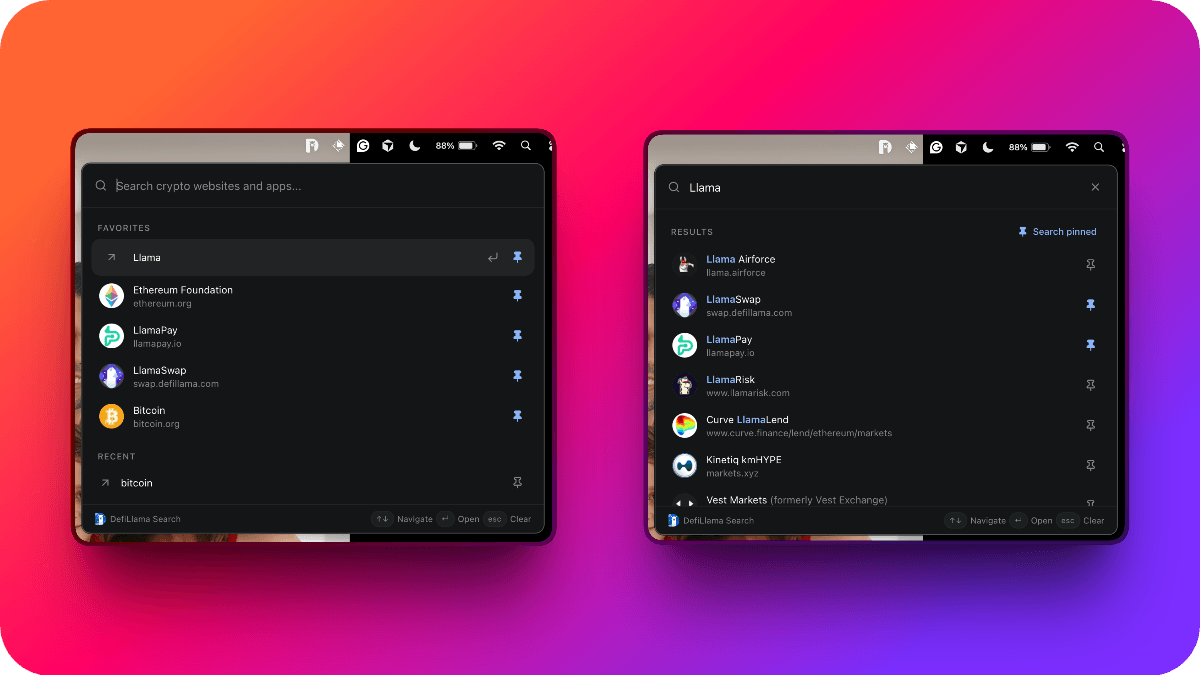
DefiLlama Search is a tiny macOS menu bar app for fast, keyboard-first access to DefiLlama Search.
Click the menu bar icon (or press ⌘⇧L) to open a compact popover, type a query, and press Enter to open the official project link in your default browser.
IMPORTANT
This is an independent open-source client. It is not developed, maintained, or endorsed by DefiLlama.
Features
Menu bar
DefiLlama Search lives in the macOS menu bar and has no Dock icon.
Left-click the tray icon to show or hide the popover. The popover is anchored near the icon. Right-click for the tray menu.
A packaged build starts at login on first launch. You can turn that off from the tray menu.
Search
The popover searches the public DefiLlama Search directory.
Move through results with ↑ and ↓. Press Enter to open the selected result in your default browser.
Recent searches and favorites
Recent queries are remembered locally, up to 8.
Pin a search result or a query as a favorite, up to 20. Favorites are stored in localStorage. When the field is empty, Favorites appear above Recent searches.
Pin buttons on a result or a recent row do not open that row. Clear history or favorites from the tray menu.
About
Open an About window from the tray menu. Close it with ⌘W or Escape.
Tips
Menu bar
Right-click the tray icon:
| Item | Action |
|---|---|
Open Search | Show the popover (⌘⇧L) |
Clear Favorites | Remove pinned items from localStorage |
Clear Search History | Remove recent queries from localStorage |
Start at Login | Toggle launch at login |
About DefiLlama Search | Open the About window |
Quit | Exit the app (⌘Q) |
Keyboard shortcuts
| Shortcut | Action |
|---|---|
| ⌘⇧L | Toggle the search popover |
| ↑ / ↓ | Move the selected row |
| Enter | Open the selected result, or restore a pinned query |
| Escape | Clear the search field (the popover stays open) |
| Click outside the popover | Hide the popover |
| ⌘W / Escape | Close the About window |
⌘⇧L is registered system-wide. During development, macOS may ask for Accessibility permission so the terminal can register it.